














Avoiding the Trapdoor: Common Pitfalls in Business Central Tenant-to-Tenant Moves
As we navigate the complex corporate landscape of 2026, characterized by rapid digital transformation and strategic consolidation across the Gulf Cooperation Council (GCC), a critical operational challenge has emerged for IT leadership: the Tenant-to-Tenant (T2T) migration of Microsoft Dynamics 365 Business Central. Driven by an unprecedented wave of mergers, acquisitions, and corporate divestitures, these migrations are no longer rare, discretionary projects; they have become pivotal high-stakes events that directly impact a company’s valuation and operational continuity.
For a Chief Information Officer (CIO) or Chief Financial Officer (CFO) in the UAE, the stakes of a Business Central T2T move are exceptionally high. A failed or poorly executed migration doesn’t just result in frustrating IT delays; it threatens data integrity, risks severe non-compliance with evolving UAE regulatory frameworks (including Federal Tax Authority requirements for Corporate Tax and e-invoicing), and can lead to catastrophic, costly downtime during a critical integration phase.
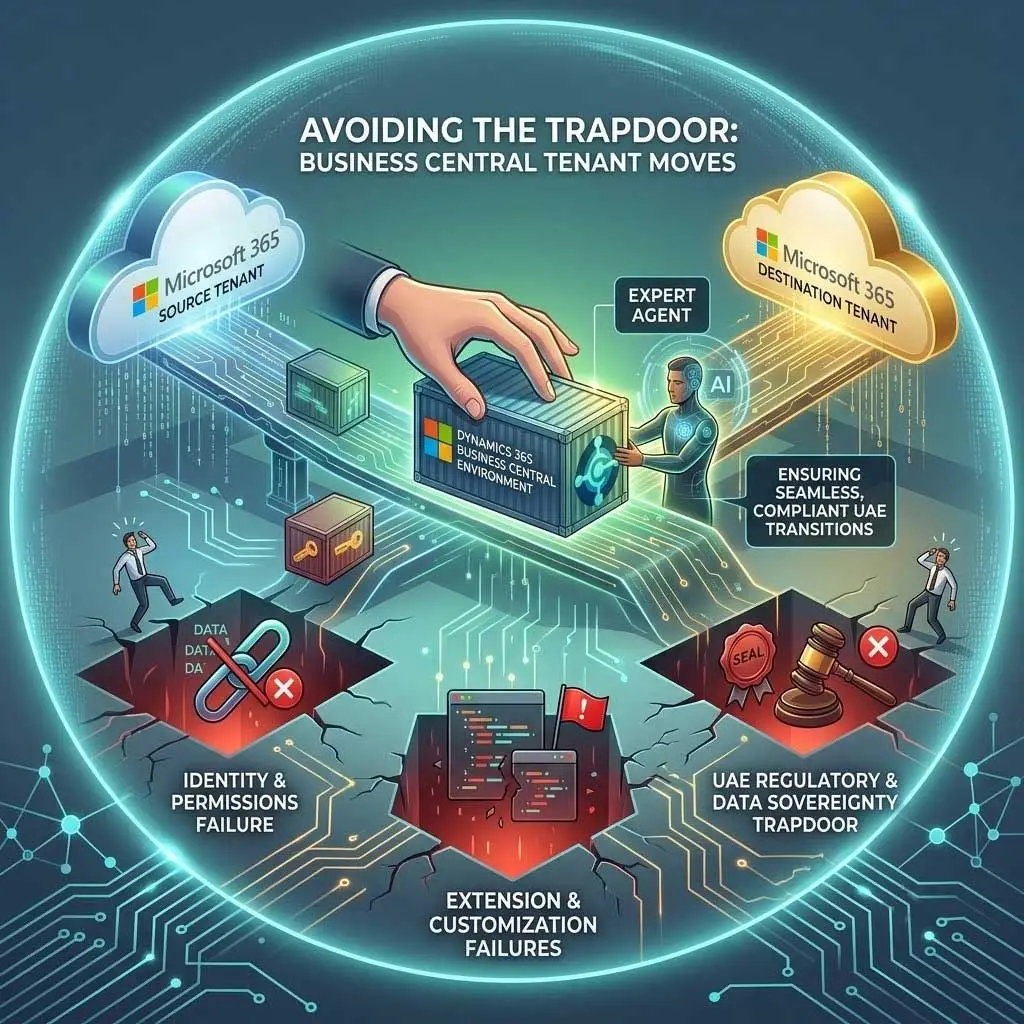
The fundamental danger lies in a pervasive misconception: treating a T2T move as a glorified “copy-paste” exercise or a standard database restoration. While Microsoft provides robust migration tools, these tools manage the movement of data, not the complete environment. They do not automatically reconstruct the delicate ecosystem of user permissions, integrated third-party applications, custom IP extensions, and, crucially, localized compliance configurations that allow your Business Central environment to function in a complex business environment. An unprepared organization treating this purely as a technical technical task, rather than a strategic business event, will quickly fall through the “trapdoor” of complexity, finding themselves in a specialized recovery scenario that is far more expensive and time-consuming than a professionally guided migration.
Here, we explore the primary technical, operational, and regulatory pitfalls in Business Central Tenant-to-Tenant moves, drawing on expert insights from the UAE’s technology sector to provide a roadmap for avoiding these critical “trapdoors.”
Pitfall #1: Treating It Like a Backup-and-Restore (The Technical Trapdoor)
The most dangerous pitfall is rooted in legacy thinking: the belief that migrating Business Central Cloud is analogous to backing up an on-premises SQL database and restoring it to a new server. In the modern cloud ecosystem of 2026, Business Central is not an isolated application; it is a node within a complex, highly integrated Microsoft 365 fabric.
A functional Business Central environment is deeply dependent on the specific configuration of the source tenant’s Microsoft Entra ID (formerly Azure Active Directory). Entra ID manages user identities, security groups, application permissions (OAuth tokens), and single-sign-on (SSO) protocols. When you attempt a direct migration of the Business Central data without accounting for the Entra ID restructuring, you are essentially transplanting a heart while leaving all the vascular and nervous systems in the source body.
The mistake of treating it purely as a data-level event results in immediate “trapdoor” consequences in the new tenant:
1. Missing Permissions: The complex web of security roles and permissions assigned to specific users or security groups on the source tenant does not automatically map to the new tenant. Users will log in to the new environment only to find they cannot access critical functions.
2. Failed Application Authentications: Every integrated application, whether a native integration like Outlook or a custom-built solution, uses specific Application IDs and secrets stored in the source Entra ID. These break immediately upon migration.
3. Broken Direct-to-App Links: Links in shared mailboxes or Microsoft Teams channels that point to specific Business Central records (e.g., an “Open Invoice” button) become invalid dead links, disrupting critical user workflows.
This technical complexity is where localized expertise is often required to reconstruct the identity landscape. A leading Custom software agency in UAE recently shared that 40% of their recovery projects originate from failed internal T2T attempts that didn’t account for these localized environment and identity configurations. They didn’t have a plan to reconstruct the delicate ecosystem of permissions, integrated apps, and custom logic that made Business Central operational.
To avoid this trapdoor, organizations must prioritize an ‘Identity and Integration Audit’ before any data is moved, mapping every Entra ID dependency that must be replicated or updated in the destination tenant.
Pitfall #2: The Extension and Customization Black Hole
The very strength of Dynamics 365 Business Central—its high degree of extensibility—becomes its biggest vulnerability during a Tenant-to-Tenant move. Most mature organizations in 2026 operate Business Central not in its standard, out-of-the-box state, but with a highly tailored configuration involving critical custom logic (extensions written in AL code) and third-party applications from AppSource.
These extensions represent the core intellectual property and bespoke business logic that differentiates your operations—think custom payroll modules configured for specific GCC regulations, localized supply chain automation, or bespoke retail interfaces.
The mistake is twofold: failing to conduct a rigorous pre-migration inventory of all extensions, and underestimating the process of making them operational in the new tenant. Organizations fall into the “Extension Black Hole” when they assume that migrating the database will automatically activate these custom solutions. It does not.
1. The Per-Tenant Extension (PTE) Barrier: Custom AL code extensions (PTEs) created specifically for your organization must be manually re-published, and in some cases, re-signed with specific developer certificates before they can be activated in the new tenant’s sandbox and production environments.
2. License and Validations: Extensions—especially those from AppSource—frequently have license validation keys tied to the specific Tenant ID of the source environment. When they load in the new environment, the license check will fail, making critical functionality immediately unavailable.
3. AL Code Compatibility: The move to a new tenant may align with a new Business Central major or minor update. A PTE that worked perfectly on the source environment may require AL code updates to comply with the base application changes on the destination tenant.
4. The AI/Automation Angle (Modern Context): As we navigate the AI-driven landscapes of 2026, the stakes of code compatibility are rising. However, the solutions are also becoming more intelligent. Specialized partners are now leveraging advanced agentic AI tools to automatically validate and, in some cases, refactor custom AL code extensions to ensure they meet the modern code standards of the destination environment, reducing the risk of manual refactoring delays that frequently derail migrations.
Pitfall #3: Regulatory, Compliance, and Data Sovereignty Issues (The “Local” Trapdoor)
Perhaps the most critical trapdoor for UAE-based enterprises, and one that is frequently overlooked during international corporate restructurings, relates to the strict frameworks of data sovereignty and localized compliance. UAE regulations around data are no longer nebulous concepts; by 2026, they are enforced realities with severe financial and operational consequences.
The “Local” Trapdoor is triggered when the migration plan fails to align the technical execution with the legal constraints. The UAE’s commitment to digitization is paralleled by its commitment to data security and tax compliance, creating a strict legal framework within which Business Central must operate:
1. Data Sovereignty (Data Stays Within the UAE): The UAE Data Protection Law (Federal Decree-Law No. 45 of 2021) dictates strict protocols on the international transfer of sensitive data. In sectors like government-linked services, healthcare, and finance, data must reside within the borders. A T2T move triggered by a global parent company may, if poorly planned, involve migrating data out of the specialized Microsoft UAE datacenters (located in Abu Dhabi and Dubai) to a regional or international tenant (e.g., in Europe or North America) to achieve tenant consolidation. This is a massive legal non-compliance event.
2. UAE Tax Authority (FTA) Compliance and Auditing: Business Central has likely been configured with specific FTA localized extensions, particularly for mandatory B2B e-invoicing (phased rollout since July 2026) and 9% Corporate Tax reporting. When the environment is moved to a global or international tenant, these localized compliance configurations must remain primary and intact. The environment must be configured to generate audit files (like the FAF-G file) and structured XML invoices that meet UAE standards, not standard international ones.
Failure here results in severe non-compliance penalties, operational cease-and-desist orders, and disastrous audit failures that can impact the valuation of the entity.
This localized risk balancing technological ambition with strict regional law that is why many companies reach out to a specialized cloud erp software company in Dubai to ensure that data remains localized within the UAE and that critical tax reporting configurations and major role in pirfalls in business, such as localized e-invoicing connectors, remain compliant after the transfer. Localized partners understand the specific auditing processes of the FTA and can configure the new environment to meet these rigid standards from day one.
Pitfall #4: Post-Migration Integration and User Experience Failures
The goal of a T2T migration is not just a successful data transfer; it is a successful operational go-live. This requires a flawless user experience from the moment employees log in to the new tenant. Yet, many T2T moves are deemed “technically successful” but fail operationally because of broken integrations and disjointed user workflows.
This final trapdoor is usually discovered the morning of go-live, and it results from treating Business Central as if it exists in a vacuum and pitfalls in business. It does not. In 2026, Business Central is the central axis of an operational ecosystem. It is deeply integrated with Outlook (for sales quotes and invoice communication), Microsoft Teams (for collaborative financial review), and Microsoft Power BI (for executive dashboards).
The operational failure occurs because the necessary post-migration configurations are neglected:
1. OAuth and API Reset: The vast majority of these integrations use OAuth tokens and API registrations (stored in the source Entra ID) to authenticate with Business Central. These must be completely re-registered and re-authenticated on the integrated application side (e.g., in the new Outlook or Teams environment), linked to the new application IDs.
2. Broken Power BI Dataflows: Dashboards that provide critical real-time insights for the CFO will fail because their underlying dataflows still point to the specific environment/company GUID of the source tenant. Every report must be re-pointed to the correct API end-points on the new environment.
3. User Access Anxiety: Even if permissions are correct, users often find they have to manually re-configure personalized views, browser bookmarks, and individual workflow notifications, creating user anxiety and slowing adoption.
To bridge these specific integration gaps, localized, bespoke solutions are often required. If the core ERP works but the field staff can no longer update inventory via their mobile app, the migration is an operational failure. To address these specialized post-migration integration needs or build custom, localized front-ends immediately after a T2T move, many enterprises find they need to Hire Microsoft Power App Developer to quickly reconnect broken workflows, reconstruct Power BI dashboards, or create specialized mobile apps for the field.
Conclusion: The Critical Role of Specialized Expertise in the UAE Market
As we move through 2026, the complexity of Dynamics 365 Business Central environment migrations in the UAE market will only increase. With mandatory e-invoicing now standard and agentic AI automating more core workflows, a T2T move is no longer a simple IT task; it is a complex, high-stakes surgical procedure on the neural network of your business.
The “Trapdoor” concept is real, and the consequences of falling through are severe. Data loss, severe non-compliance, months of operational disruption, and the financial cost of a specialized recovery project far outweigh the strategic cost of professional implementation.
IT leaders must treat a Business Central Tenant-to-Tenant move with the respect and meticulous planning it demands. This starts with a rigid pre-migration assessment, a focus on identity reconstruction, a strict audit of all custom AL code, and a guarantee of data localized for UAE tax and data sovereignty laws.
The final piece of advice for organizations navigating these complex moves is clear: Do not attempt this alone. The value of specialized expertise cannot be overstated. By partnering with a certified Microsoft Solutions Provider who possesses deep, specific experience in the complex regulatory and technological landscape of the UAE market, you are not just outsourcing a task; you are investing in operational continuity, legal compliance, and the future success of your enterprise in the Gulf’s dynamic 2026 digital economy.
Frequently Asked Question’s
1. What exactly is a Business Central Tenant-to-Tenant (T2T) migration?
A T2T migration is the process of moving a specific Dynamics 365 Business Central environment (including its financial data, configurations, and custom code) from one Microsoft 365 Azure Active Directory (Entra ID) organizational unit to another. This is distinct from moving between geographic regions within the same tenant.
2. When should a business consider a Business Central Tenant-to-Tenant move?
These migrations are typically triggered by significant corporate restructurings, including:
- Mergers & Acquisitions: Merging the Business Central operations of two entities into a single tenant.
- Divestitures & Spin-offs: Splitting a subsidiary off into its own independent Microsoft 365 tenant.
- Corporate Branding Changes: Moving to a new tenant with a different primary domain name to align with a major rebrand.
3. Why can’t I just use Microsoft’s administrative tools for this migration myself?
While Microsoft offers administrative tools for environments, they move the data, not the complete ecosystem. A self-guided T2T move requires deep knowledge of Microsoft Entra ID (permissions, user mapping, SSO), custom AL code extensions (PTEs), and AppSource licensing validations. Without professional guidance, users will likely encounter broken integrations, missing permissions, and localized non-compliance.
4. How long does a typical Business Central Tenant-to-Tenant migration take?
The timeline is highly variable based on complexity. A small environment with minimal customizations may take 4–6 weeks for planning, validation, and execution. An enterprise-level environment with significant multi-entity complexity, extensive custom AL code, and numerous external integrations could require 3 to 6 months of meticulous coordination to ensure a seamless “go-live.”
5. What are the key regulatory risks when performing a T2T move within the UAE?
For UAE-based enterprises in 2026, the critical risks are:
- Data Sovereignty: Moving data out of the specialized UAE Microsoft datacenters (located in Abu Dhabi and Dubai) may violate the UAE Data Protection Law (Federal Decree-Law No. 45 of 2021).
- Tax Compliance (FTA): The migration must preserve localized configurations for mandatory B2B e-invoicing and 9% Corporate Tax reporting, ensuring continued compliance with Federal Tax Authority standards.
6. What happens to my custom extensions and AppSource apps during the migration?
Custom extensions (Per-Tenant Extensions) must be manually re-published, and potentially re-signed, on the destination tenant. AppSource apps usually require license re-validation or key updates because their subscription is often tied to the specific source Tenant ID. A pre-migration audit by a specialized partner is essential to prevent critical business logic from failing in the new environment.
7. How will my Business Central integrations (like Outlook, Teams, or Power BI) be affected?
Most integrations will break upon migration because they rely on specific application permissions and OAuth tokens stored in the source Entra ID. Post-migration configurations are essential to re-point these integrated applications (Outlook add-ins, Teams channels, Power BI data sources) to the new GUID of the destination environment and authenticate them using the new tenant’s identity framework.
8. What is the financial cost of a failed or poorly executed T2T migration?
The immediate cost of a failed T2T move far exceeds the investment in a professionally guided migration. Costs include:
- Operational Downtime: Massive revenue loss if employees cannot use the ERP during critical periods.
- Data Recovery: The premium expense of a specialized Custom software agency in UAE to recover lost data and broken configurations.
- Regulatory Penalties: Severe financial penalties from UAE authorities for non-compliance with data sovereignty or tax laws.